Google Now Requires MCP for AI Agents on Workspace
From 1 February 2027, AI agents must use Google's Workspace MCP servers or CLI instead of the REST APIs. Here's who counts as an agent, how Gmail sending and approvals work, the 30-day data rules, the free quotas, and a checklist for builders.
Say you built a small assistant last month. It reads your Gmail, summarises the unread threads every morning and drafts replies. It calls the Gmail REST API with an OAuth token, and it works fine. On 24 November 2026, Google changed the rules for exactly this kind of app.
If MCP is new to you, I explained how hosts, clients and servers fit together, and what can go wrong, in MCP Explained: What's the worst that could happen?. And if you're wondering where skills and CLIs fit in, my post Agent Skills vs MCP vs CLI: When to Use Each is the background for everything below.
So let's take this step by step.
What exactly did Google announce?
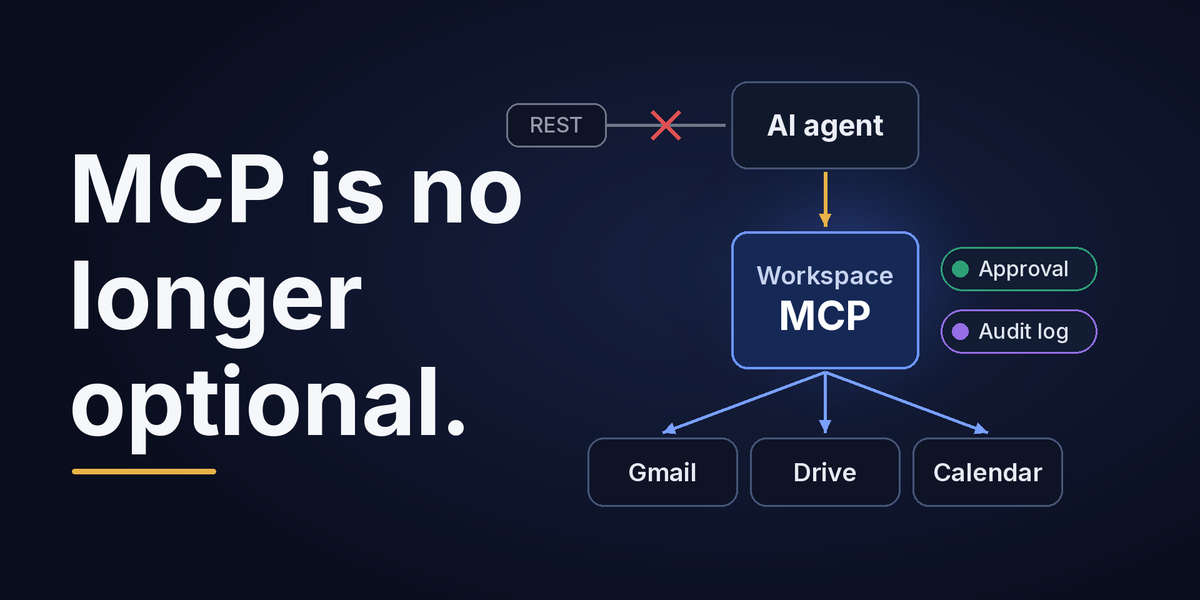
Google made eight Workspace MCP servers generally available: Gmail, Drive, Docs, Sheets, Slides, Calendar, Chat and Tasks, with Keep listed as coming soon. Alongside them, it made the official Workspace CLI generally available for agents that run in a terminal, a VM or a container. The CLI ships with packaged agent skills.
Then came the part that turned this from a launch into a rule. A new Workspace AI Tools Addendum to the Google APIs Terms of Service says:
The GWS Access Tool must use a Google MCP where the GWS Access Tool is or is driven by an AI Agent, an AI Harness or an AI model or service employing an AI model.
The next sentence says you may not disguise your tool to avoid that classification.
Here are the dates that matter:
| Date | What happens |
|---|---|
| 24 Nov 2026 | MCP servers and CLI generally available; Standard and Scaled usage tiers launch |
| 1 Feb 2027 | The AI Tools Addendum takes effect, and the MCP-or-CLI requirement for AI agents is enforced |
| 1 Apr 2027 | Scaled-tier billing starts for Gmail, Calendar and Drive (APIs, MCP servers and CLI) |
Who counts as an "AI agent" here?
The definitions are wide on purpose. The addendum defines an AI Agent as a goal-oriented AI system or workflow that performs tasks on your behalf, supervised or autonomous. An AI Harness is the software layer that deploys an agent, invokes tools or orchestrates tasks. So it's not only big products. A personal script that pipes your inbox into an LLM looks like it's covered too.
What's not covered is software with no model in the loop. A nightly backup job or a deterministic sync script is not "driven by" an AI model, so the MCP requirement doesn't apply to it. Google's advice is to keep those traditional features on a separate OAuth client from your agent.
And what if an agent keeps calling REST anyway? Google's quota documentation says that from 1 February 2027, AI agents that call the Workspace REST APIs directly are limited to Standard-tier quotas, whatever tier the project pays for. On top of that, it would be a breach of the terms.
Why is Google doing this?
Google frames this as keeping organisations in control, and the problem it's solving is real. An OAuth token was designed for apps acting on a person's clear intent. An agent can read an email that says "forward the last ten invoices to this address" and, with the right scope, actually do it. That's prompt injection, and a valid token does nothing to stop it.
So Google puts the policy in the request path. According to Google, agents that connect through its MCP servers or CLI get:
- Admin control: agents have to identify themselves in OAuth, so admins can manage them in the Admin console like any other app.
- Human-in-the-loop confirmations: admins can require users to confirm sensitive actions, such as reading external files or sharing data.
- DLP and audit logs: existing data loss prevention rules apply automatically, and agent actions are recorded in the audit logs.
Google also says MCP tools return summarised results inside Workspace's boundary instead of raw data, which lowers token cost.
Think of it like a building that used to give every visitor a master key. Now there's a reception desk. You still get in, but you sign in, you get a badge, and some doors ask you to call the person you're visiting first.
Can the Gmail MCP server send email?
This was the loudest question of the week. When Tech Stackups reviewed the docs on 26 November, Gmail's send, reply, forward and draft-editing tools were marked as needing partner access, so a normal developer's agent could create drafts but not send them.
The docs have since moved. Google's Gmail quota page, updated on 27 November, now lists send_message, reply, forward and update_draft on the main /mcp/v1 endpoint without a partner note.
The catch is how sending works. Google's MCP servers ask for human approval using MCP form elicitation, where the server pauses a tool call and asks the user to confirm through the host app. Each server has two endpoints:
/mcp/v1is the main one. It exposes all tools, including those that always need approval. Your MCP host must support form elicitation./mcp/v1selfis a fallback for hosts that can't show approval forms. It leaves out tools that always need approval, and list and search calls return only results that don't need it.
So if your agent "can only draft", check which endpoint it's connected to before you blame Google. And because this changed within a week of launch, don't plan around any one blog post (including this one). Run tools/list against your own project and see what you actually get.
Why do the data rules matter more than MCP?
Switching protocols is a few days of work. The data rules can change your product.
The addendum introduces "Google Technical Information", which explicitly includes vector embeddings, memory indexes, user profiles and organisational graphs derived from Workspace. Under the new terms you may not:
- keep that information for more than 30 days;
- process user data or that information for anything other than active, user-authorised tasks;
- keep any of it after the user disconnects your tool;
- use it for model training, fine-tuning, building eval datasets or distillation;
- use it to build a product similar to a Workspace service.
Now imagine an assistant that builds a long-term index of your inbox so it can answer "what did we agree with this vendor last year?". Under these rules, that index can't live longer than 30 days. You either rebuild it regularly or design the feature differently.
How much can you use for free?
Every project starts on the free Standard tier: up to 5,000 requests per day, per project, per product, across the MCP servers. Some tools count as more than one request. In Gmail, search_threads and list_drafts each count as 10, so an agent that only searches gets about 500 searches a day for the whole project, not per user.
If you need more, you enrol in the paid Scaled tier. From 1 April 2027, Scaled-tier MCP usage for Gmail, Calendar and Drive is billed from the first request, while REST usage gets daily no-charge allowances. Google says over 99% of active developers currently fit inside the Standard tier.
Where do skills and the CLI fit?
This is the first time a big platform has shipped all three access styles for one product, so it's a good real-world test of the skill vs MCP vs CLI question:
| Your agent | What Google points you to |
|---|---|
| Runs in the cloud or a web app | Workspace MCP servers |
| Runs in a terminal, VM or container (like a coding agent) | Workspace CLI |
| Needs to know how to do a task well | The packaged agent skills that ship with the CLI |
Same idea as before: MCP and the CLI give the agent access, and skills give it the procedure.
What should you do before 1 February 2027?
If you build agents on Workspace:
- Mark your agent's OAuth client as agentic. Google asks you to select "Use this client for an AI-powered agent" on OAuth clients used by agents, and to keep non-agent features on a separate client.
- Move agent traffic to the MCP servers or the CLI. List every operation your product needs and check it against
tools/liston your own project. - Support form elicitation in your host, or accept the smaller
/mcp/v1selftool set. - Audit what you store. Embeddings, memory indexes and user profiles built from Workspace data need a 30-day limit and deletion on disconnect.
- Check your usage. The new Workspace API usage dashboard shows each project against the Standard limits.
If you're a Workspace admin, the new controls live in the Admin console under Security > API Controls. It's worth setting approval rules there before people start connecting agents.
The bigger picture
For a long time, MCP was optional plumbing: a nice, standard way to plug tools into an assistant. With this change, it becomes the place where a platform enforces its policy: who the agent is, what it may do, what needs a human "yes", and what gets logged.
So the question for Workspace is no longer "should I use MCP?". It's "what will my agent be allowed to do through it?". Answer that before February, not after.
References
- Simplifying agent access while keeping organizations in control: MCP servers, CLI, standardized usage tiers, and admin policies — Google Workspace Updates, 24 Nov 2026.
- Workspace AI Tools Addendum — Google, last modified 24 Nov 2026.
- Usage tiers and quotas for Google Workspace APIs and MCP servers — Google for Developers, accessed 27 Nov 2026.
- Gmail API and MCP server quotas — Google for Developers, updated 27 Nov 2026.
- Handle user approvals with form elicitation — Google for Developers, accessed 27 Nov 2026.
- Google Will Make AI Agents Use Its Workspace MCP Servers. The Gmail One Can't Send Email — Tech Stackups, 26 Nov 2026.